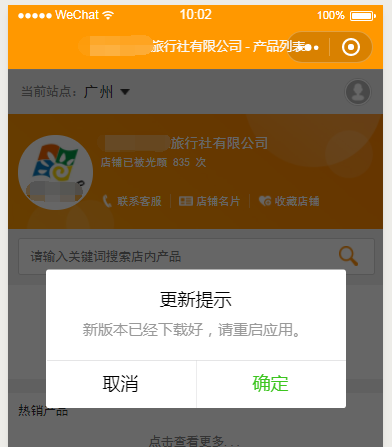
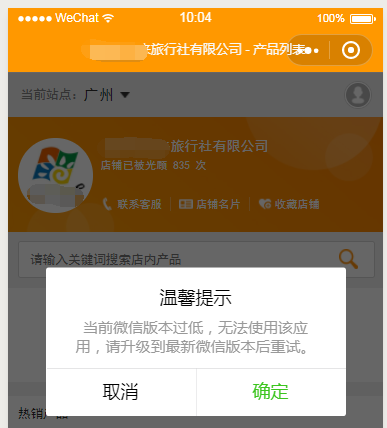
检测并获取微信小程序更新,使用新版本功能API wx.getUpdateManager 用法示例
原文来自:http://www.copterfly.cn/sundries/wx-getUpdateManager.html
已经发布的小程序(假设版本为 v1.0)如果有修改,上传、发布、审核过新版本(假设版本为 v2.0)后,已经使用过该小程序的用户再次使用该小程序时,使用的还是 v1.0,不会自动更新到 v2.0。
情况跟网页的缓存类似。在网页端我们修改 js 文件后,都会给它后面加个版本号,这样用户在你更新后再次访问网页时,新的修改就生效了。
微信小程序的更新并没有类似 js 加版本号的用法,但是我们可以使用它的 API wx.getUpdateManager() 来检测并获取小程序更新。
官方介绍:获取全局唯一的版本更新管理器,用于管理小程序更新。
API相关文档: https://developers.weixin.qq.com/miniprogram/dev/api/getUpdateManager.html
代码
放在 app.js 的 onLaunch 里执行即可。
// app.js
App({
    onLaunch: function(options) {
        //console.log('onLaunch:', options);
        // 检测并获取小程序更新 api 说明:https://developers.weixin.qq.com/miniprogram/dev/api/getUpdateManager.html
        if (wx.canIUse('getUpdateManager')) { // 基础库 1.9.90 开始支持,低版本需做兼容处理
            const updateManager = wx.getUpdateManager();
            updateManager.onCheckForUpdate(function(result) {
                if (result.hasUpdate) { // 有新版本
                    updateManager.onUpdateReady(function() { // 新的版本已经下载好
                        wx.showModal({
                            title: '更新提示',
                            content: '新版本已经下载好,请重启应用。',
                            success: function(result) {
                                if (result.confirm) { // 点击确定,调用 applyUpdate 应用新版本并重启
                                    updateManager.applyUpdate();
                                }
                            }
                        });
                    });
                    updateManager.onUpdateFailed(function() { // 新的版本下载失败
                        wx.showModal({
                            title: '已经有新版本了哟~',
                            content: '新版本已经上线啦~,请您删除当前小程序,重新搜索打开哟~'
                        });
                    });
                }
            });
        }
        else { // 有更新肯定要用户使用新版本,对不支持的低版本客户端提示
            wx.showModal({
                title: '温馨提示',
                content: '当前微信版本过低,无法使用该应用,请升级到最新微信版本后重试。'
            });
        }
    },
});
微信开发者工具调试设置
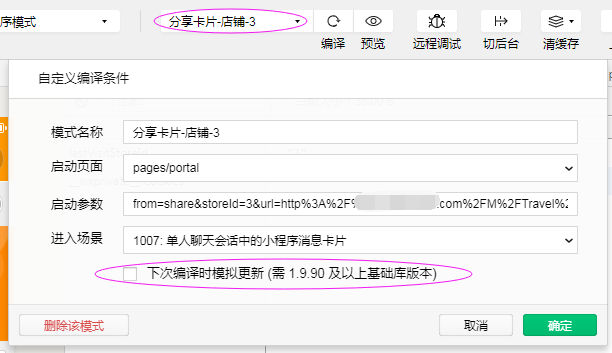
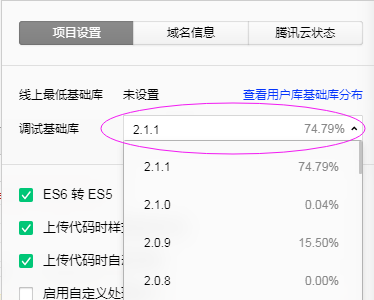
调试效果