代码来自:http://www.cnblogs.com/yeyerl/p/7099157.html
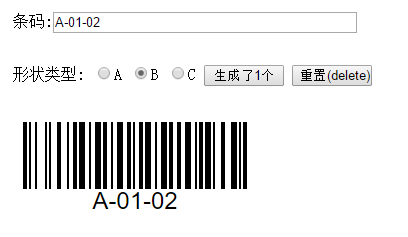 demo
demo
<!doctype html>
<html>
<head>
<meta charset="utf-8">
<title>条形码生成器by逊王之王</title>
<style type="text/css">
.barcode {
float: left;
clear: both;
padding: 0 10px; /*quiet zone*/
overflow: auto;
height: 0.5in; /*size*/
}
.right {
float: right;
}
.barcode + * {
clear: both;
}
.barcode div {
float: left;
height: 0.35in; /*size*/
}
.barcode .bar1 {
border-left: 1px solid black;
}
.barcode .bar2 {
border-left: 2px solid black;
}
.barcode .bar3 {
border-left: 3px solid black;
}
.barcode .bar4 {
border-left: 4px solid black;
}
.barcode .space0 {
margin-right: 0
}
.barcode .space1 {
margin-right: 1px
}
.barcode .space2 {
margin-right: 2px
}
.barcode .space3 {
margin-right: 3px
}
.barcode .space4 {
margin-right: 4px
}
.barcode label {
clear: both;
display: block;
text-align: center;
font: 0.125in/100% helvetica; /*size*/
}
/*** bigger ******************************************/
.barcode2 {
float: left;
clear: both;
padding: 0 10px; /*quiet zone*/
overflow: auto;
height: 1in; /*size*/
}
.barcode2 + * {
clear: both;
}
.barcode2 div {
float: left;
height: 0.7in; /*size*/
}
.barcode2 .bar1 {
border-left: 2px solid black;
}
.barcode2 .bar2 {
border-left: 4px solid black;
}
.barcode2 .bar3 {
border-left: 6px solid black;
}
.barcode2 .bar4 {
border-left: 8px solid black;
}
.barcode2 .space0 {
margin-right: 0
}
.barcode2 .space1 {
margin-right: 2px
}
.barcode2 .space2 {
margin-right: 4px
}
.barcode2 .space3 {
margin-right: 6px
}
.barcode2 .space4 {
margin-right: 8px
}
.barcode2 label {
clear: both;
display: block;
text-align: center;
font: 0.250in/100% helvetica; /*size*/
}
.divCent {
width: 100%;
background-color: transparent;
text-align: center;
margin: 0 auto;
}
</style>
<script type="text/javascript">
(function() {
if (!exports)
var exports = window;
var BARS = [ 212222, 222122, 222221, 121223, 121322, 131222, 122213,
122312, 132212, 221213, 221312, 231212, 112232, 122132, 122231,
113222, 123122, 123221, 223211, 221132, 221231, 213212, 223112,
312131, 311222, 321122, 321221, 312212, 322112, 322211, 212123,
212321, 232121, 111323, 131123, 131321, 112313, 132113, 132311,
211313, 231113, 231311, 112133, 112331, 132131, 113123, 113321,
133121, 313121, 211331, 231131, 213113, 213311, 213131, 311123,
311321, 331121, 312113, 312311, 332111, 314111, 221411, 431111,
111224, 111422, 121124, 121421, 141122, 141221, 112214, 112412,
122114, 122411, 142112, 142211, 241211, 221114, 413111, 241112,
134111, 111242, 121142, 121241, 114212, 124112, 124211, 411212,
421112, 421211, 212141, 214121, 412121, 111143, 111341, 131141,
114113, 114311, 411113, 411311, 113141, 114131, 311141, 411131,
211412, 211214, 211232, 23311120 ], START_BASE = 38, STOP = 106;
function code128(code, barcodeType) {
if (arguments.length < 2)
barcodeType = code128Detect(code);
if (barcodeType == 'C' && code.length % 2 == 1)
code = '0' + code;
var a = parseBarcode(code, barcodeType);
return bar2html(a.join('')) + '<label>' + code + '</label>';
}
function bar2html(s) {
for (var pos = 0, sb = []; pos < s.length; pos += 2) {
sb.push('<div class="bar' + s.charAt(pos) + ' space'
+ s.charAt(pos + 1) + '"></div>');
}
return sb.join('');
}
function code128Detect(code) {
if (/^[0-9]+$/.test(code))
return 'C';
if (/[a-z]/.test(code))
return 'B';
return 'A';
}
function parseBarcode(barcode, barcodeType) {
var bars = [];
bars.add = function(nr) {
var nrCode = BARS[nr];
this.check = this.length == 0 ? nr : this.check + nr * this.length;
this.push(nrCode || ("UNDEFINED: " + nr + "->" + nrCode));
};
bars.add(START_BASE + barcodeType.charCodeAt(0));
for (var i = 0; i < barcode.length; i++) {
var code = barcodeType == 'C' ? +barcode.substr(i++, 2) : barcode
.charCodeAt(i);
converted = fromType[barcodeType](code);
if (isNaN(converted) || converted < 0 || converted > 106)
throw new Error("Unrecognized character (" + code
+ ") at position " + i + " in code '" + barcode + "'.");
bars.add(converted);
}
bars.push(BARS[bars.check % 103], BARS[STOP]);
return bars;
}
var fromType = {
A : function(charCode) {
if (charCode >= 0 && charCode < 32)
return charCode + 64;
if (charCode >= 32 && charCode < 96)
return charCode - 32;
return charCode;
},
B : function(charCode) {
if (charCode >= 32 && charCode < 128)
return charCode - 32;
return charCode;
},
C : function(charCode) {
return charCode;
}
};
// --| Export
exports.code128 = code128;
})();
/*
* showDiv:代表需要显示的divID, textVlaue : 代表需要生成的值, barcodeType:代表生成类型(A、B、C)三种类型
*
*/
function createBarcode(showDiv, textValue, barcodeType) {
var divElement = document.getElementById(showDiv);
divElement.innerHTML = code128(textValue, barcodeType);
}
function createBarcode2(showDiv, textValue, barcodeType) {
var divElement = document.getElementById(showDiv);
divElement.innerHTML = code128(textValue, barcodeType);
}
/*****************************************上方为基础JS******************************************/
/*
* 页面加载时先选择B类型
*/
function onloadfct() {
document.getElementById("hidStr").value = 'B';
selectText();
}
/*
* 选择类型时将类型值赋给隐藏控件
*/
function ChangeDdl(obj) {
document.getElementById("hidStr").value = obj.value;
}
var num = 1; //全局变量存储按钮点击次数
/*
*生成条形码的方法
*/
function creta(){
var a = num++;
var divid = "div"+a; //定义div的id
document.all.pertxt.innerHTML = ""; //清空说明文档
document.all.tddiv.innerHTML = "</br><div class='barcode2' style='text-align:center;' id='"+divid+"'></div></br></br>"+document.all.tddiv.innerHTML;
createBarcode(divid,document.all.txtCode.value,document.all.hidStr.value);
document.all.btn.value="生成了"+a+"个";
selectText();
}
/*
* 设置快捷键
*/
document.onkeydown = function(e){
if((e||event).keyCode==13){ //按下enter键
creta();
}
if((e||event).keyCode==9){ //按下tab键
creta();
}
if((e||event).keyCode==46){ //按下delete键
history.go(0);
}
if((e||event).keyCode==36){ //按下home键
history.go(0);
}
};
/*
*文本框焦点和全选
*/
function selectText(){
document.getElementById("txtCode").focus();
document.getElementById("txtCode").select();
}
</script>
</head>
<body onload="onloadfct();">
<input id="hidStr" name="hidStr" type="hidden" />
<table width="100%" border="0" id="tab">
<tr height="50px">
<td width="30%"> </td>
<td width="40%">条码:<input type="text" id="txtCode" style="width:300px;"></td>
<td width="30%"> </td>
</tr>
<tr height="50px">
<td> </td>
<td>
形状类型:
<label><input name="rad" type="radio" onclick="ChangeDdl(this);" value="A" />A</label>
<label><input name="rad" type="radio" onclick="ChangeDdl(this);" checked value="B" />B</label>
<label><input name="rad" type="radio" onclick="ChangeDdl(this);" value="C" />C</label>
<input type="button" value ="生成(enter)" title="快捷键:enter或者tab" id="btn" style="width:80px;" onclick="creta();"/>
<input type="button" value ="重置(delete)" title="快捷键:delete或者home" style="width:80px;" onclick="history.go(0);"/>
</td>
<td> </td>
</tr>
<tr height="150px">
<td> </td>
<td id="tddiv">
<pre id="pertxt" style="color:#021294; width:360px; white-space: pre-wrap; line-height:2; font-size:14px;">
说明:
1:在条码文本框输入想要生成条码的内容,点击生成按钮(快捷键enter或者tab)生成条码。
2:为方便扫码后查看历史条码,条码可以无限生成,排在最上面的条码永远是最新的条码。
3:点击重置按钮(快捷键delete或者home)将会刷新整个页面,已经生成的条码将会清空,此操作不可逆。
4:形状类型分A、B、C、3种,默认使用B类型,也是最实用的类型,可以输入数字和英文字符,如果发现生成的二维码跟实际不符合,可以切换形状类型后尝试。
5:点击生成按钮后,条形码文本框自动全选,方便输入下一个条形码。
6:本代码紧做参考,如需扩展请自行修改html源码,源码中都有相应注释。
作 者:逊王之王
出 处:<a href="http://www.cnblogs.com/yeyerl" target="_blank">http://www.cnblogs.com/yeyerl</a>
</pre>
</td>
<td></td>
</tr>
</table>
</body>
</html>