wordpress发布文章和页面时,添加确认框
或许你也遇到过这样的情况,在文章还没有完全写好的情况下,不小心碰到了发布文章的按钮。我们WordPress主机的用户,给我们反映过类似的问题。下面这段简单的代码,可以解决这个问题,本应该成为 WordPress 核心代码。加上这段代码之后,当你点击到发布文章按钮后,会弹出一个对话框,要求你确认。
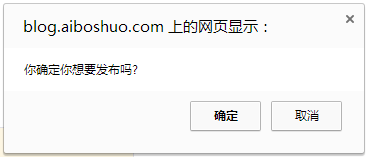
这段代码来自 GitHub Gist 网站:
/* ------------------------------------------------------ */
// Add confirmation dialogue box when publishing posts/pages
// https://gist.github.com/plasticmind/4337952
/* = Add a "molly guard" to the publish button */

add_action( 'admin_print_footer_scripts', 'sr_publish_molly_guard' );
function sr_publish_molly_guard() {
    echo "
    <script>
        jQuery(document).ready(function($){
            $('#publishing-action input[name=\"publish\"]').click(function() {
                if(confirm('Are you sure you want to publish this?')) {
                    return true;
                } else {
                    $('#publishing-action .spinner').hide();
                    $('#publishing-action img').hide();
                    $(this).removeClass('button-primary-disabled');
                    return false;
                }
                });
            });
    </script>
    ";
}
/* ------------------------------------------------------ */