WordPress制作彩色标签云页面
看到DAFI博客的彩色标签页面,早就想弄一个,只是一直没对手,昨晚,花了不少时间折腾,总算是成功了,现在分享一下方法。
彩色标签云演示:https://pdbn.top/file.html
倡萌现在使用的是Tstyle主题,所以就在 Tstyle的基础上制作,其他主题的朋友就自己参考咯。
注意:千万不要使用 txt记事本来编辑php文件,否则出现任何问题,请自己负责,此外,建议先做好文件备份。
1、制作Tags模板
首先,我们要制作一个Tags模板,这里我们直接拿Tstyle 中的 page.php来直接修改。使用dreamweaver等编辑器打开page.php,在最顶部插入以下代码:
<?php
/*
Template Name: Tags
*/
?>
上面的代码是用来表明这是一个模板文件。
接着,找到page.php中下面的文章内用调用标志代码:
<div id="page-cnt"><?php the_content(); ?></div>
用下面Tags的调用代码替代上面的代码:
<div id="page-cnt" class="tags">
<?php wp_tag_cloud('smallest=12&largest=18&unit=px&number=0&orderby=count&order=DESC');?>
</div>
注:上面的代码中,smallest表示标签的最小字号,largest表示最大字号,unit=px表示字体使用像素单位,number=0表示显示所有标签,orderby=count表示按照标签所关联的文章数来排列,order=DESC表示降序排序(ASC表示升序排序,DESC表示降序排序)。
最后,去除评论判断功能,删除page.php中下面的代码:
<?php if (comments_open()) comments_template( '', true ); ?>
另存为 tags.php,这样一来,一个Tags模板就做好了,最终的代码如下:
<?php
/*
Template Name: Tags
*/
?>
<?php get_header(); ?>
<?php if ( have_posts() ) while ( have_posts() ) : the_post(); ?>
<div id="content">
<div class="f-s"></div>
<div class="f-m">
<h2>
<em><a title="回到首页" href="<?php bloginfo('home'); ?>">首页</a></em>
<span class="cut">»</span>
<em><?php the_title(); ?></em>
</h2>
<div class="box" id="post-<?php the_ID(); ?>">
<div id="page-cnt" class="tags">
<?php wp_tag_cloud('smallest=12&largest=18&unit=px&number=0&orderby=count&order=DESC');?>
</div>
</div>
</div>
<div class="f-e"></div>
</div><!-- /content -->
<?php endwhile; ?>
<?php
get_sidebar();
get_footer();
?>
2、在style.css文件中添加CSS样式
这时候,我们需要添加css样式,在style.css文件后面添加以下的样式代码,标签的间距就会好看些。
#page-cnt.tags,
#page-cnt.friends { height: 576px; padding: 6px 0 0; overflow: hidden; line-height: 30px; }
#page-cnt.tags,
#page-cnt.friends { height: auto; padding-top: 5px; overflow: visible; }
.tags a { display: inline-block; margin: 0 4px; white-space: nowrap; }
3、添加彩色功能
打开主题中的functions.php文件,在最末端的 ?>前面添加下面的代码,就可以实现彩色标签云了:
function colorCloud($text) {
$text = preg_replace_callback('|<a (.+?)>|i','colorCloudCallback', $text);
return $text;
}
function colorCloudCallback($matches) {
$text = $matches[1];
$color = dechex(rand(0,16777215));
$pattern = '/style=(\'|\”)(.*)(\'|\”)/i';
$text = preg_replace($pattern, "style=\"color:#{$color};$2;\"", $text);
return "<a $text>";
}
add_filter('wp_tag_cloud', 'colorCloud', 1);
4、发布Tags页面
上传到Tstyle主题根目录,到后台新建一个页面,在右边的“页面属性”选择Tags模板文件,不用填写任何内容,直接发布这个页面,就可以看到tags页面啦。
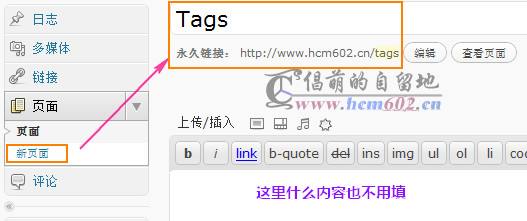
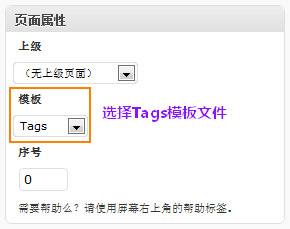
到这里为止,你就可以看到你的标签云页面啦。
注:侧边栏的标签云可以也使用下面的代码直接调用:
<?php wp_tag_cloud('smallest=12&largest=18&unit=px&number=20');?>
原文来自http://www.cmhello.com/colorful-tag-cloud-page-for-wordpress.html