禁止WordPress自动添加分段标签<p>
WordPress 有个自动分段机制,只要你在可视化下敲击一次回车(文本模式敲击两次回车),就会在前台html自动添加分段标签<p>,文本模式敲击一次次回车添加</br>,其实这个功能也是很方便的,但是有些朋友就是不习惯,或者在某些情况下干扰了自己的文章内容格式。
这个自动分段机制,使用的是wpautop()函数,只会对文章内容和摘要生效,如果你希望禁用它,可以将下面的代码添加到主题的 functions.php 文件即可:
remove_filter( 'the_content', 'wpautop' ); //正文
remove_filter( 'the_excerpt', 'wpautop' ); //摘要
remove_filter( 'comment_text', 'wpautop', 30 );//取消评论自动
但是这样一来,就会使所有文章类型的文章都失去自动分段功能,要解决这个问题,我们可以在主题的 functions.php 添加下面的代码:
function needRemoveP() {
 remove_filter('the_content', 'wpautop');
}
然后在你想去掉功能的地方,比如想让文章去掉这个默认的功能,则在single.php里添加:
<?php add_action ('loop_start', 'needRemoveP'); ?>
其实我们还有更加方便的方法,不需要修改 single.php 文件,而是通过条件标签来判断,在主题 functions.php 使用下面的代码:
function needRemoveP() {
 if ( get_post_type() == 'post'){ // 如果文章类型为 post
 remove_filter('the_content', 'wpautop');
 }
}
add_action ('loop_start', 'needRemoveP');
以上代码的第 2 行就限定了文章类型为 post 的文章才会取消自动分段,你可以根据自己的需要修改文章类型。
上面是来自http://www.wpdaxue.com/disable-autop.html的方法用于禁止添加<p>标签
下面是来自http://www.solagirl.net/how-to-disable-wpautotop.html的方法,用于回车添加</br>标签
在 functions.php中添加如下代码:
function disable_autop() {
 global $post;
 $disable_autop_var = get_post_meta($post->ID, 'disable_autop', TRUE);
 if ( !empty( $disable_autop_var ) ) {
 remove_filter('the_content', 'wpautop');
 }
 }
add_action ('loop_start', 'disable_autop');
在你需要禁用wpautop的文章中,添加自定义字段custom field,键是disable_autop,值为true
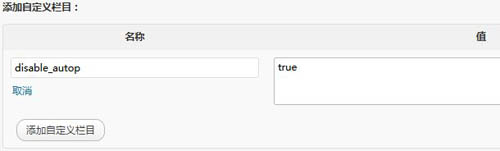
wpautop()函数介绍
<?php wpautop( $foo, $br ); ?>
$foo需要转换的文字
$br是否将换行符转换为br标签,默认为true,也就是说单换行(line-breaks,编辑器中用shift+enter产生的换行)会被转换成</br>标签。
wpautop会自动应用到the_content和the_excerpt上。