WordPress中get_template_part()函数详细介绍
我们知道,调用header.php可以用get_header()方法,调用footer.php可以用get_footer()方法,调用 sidebar.php可以用get_sidebar()方法,那么,调用自定义模板文件的时候,我们需要用get_template_part()函 数。
为什么要自定义模板文件?
比如,分类页、标签页、作者页、甚至首页可能都需要用到一段共同的代码——以摘要方式输出文章。那么,我们可以将这段代码放到content.php中,然后在分类、标签、作者和首页模板文件调用content.php,以减少代码重写量。
get_template_part()函数用法
get_template_part()函数的使用很灵活,不仅仅是加载一个模板文件进来,而且还有备用的选项,调用代码如下:
<?php get_template_part( $slug, $name ); ?>
参数:
$slug (必须) 通用的模板名
$name (可选) 指定的模板名
具体示例1:
<?php get_template_part( 'content', 'loop' ); ?>
意思是说,如果content-loop.php存在,则调用content-loop.php,否则,就调用content.php
具体示例2:
<?php get_template_part( 'content', get_post_format() ); ?>
get_template_part 主要是获取子模板,get_post_format()主要是获取当前文章属于那种,然后加载相应的模板,所以他的模板文件就是content-aside.php,content-link.php,content-image.php,等。非常人性化的效果啊,如果以上某一个不存在,就会自动调用conttent.php
get_template_part 获取的子模板和后台编辑文章时对应的文章形式一一对应。
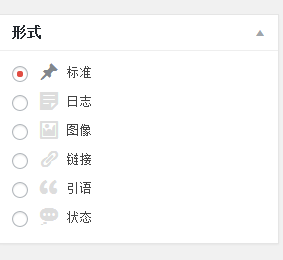
ps:注册文章形式的方法