删除默认添加的rel=“attachment wp-att-**”修复LightBox效果
WordPress好像是从更新 V4.4 开始,在添加媒体文件时,会自动在媒体文件的链接 a href=” ”中,添加一个链接Rel,例如:
<a href="http://example.com/?attachment_id=1375" rel="attachment wp-att-1375"><img src="http://example.com/wp-content/uploads/2012/09/image-300x78.jpg" alt="image.jpg" width="300" height="78" class="alignnone size-medium wp-image-1375" /></a>
如果大家正在使用LightBox,结果就会出现在一个链接中,有两个 rel ,而且wordpress系统默认添加的 rel 还在前面,使得LightBox效果出错。
解决方法:
1.手动删除
在添加好媒体后,点击媒体文件,在弹出的菜单中,选择“编辑”,再“高级选项”,“链接rel ”删除其中的内容,“更新”
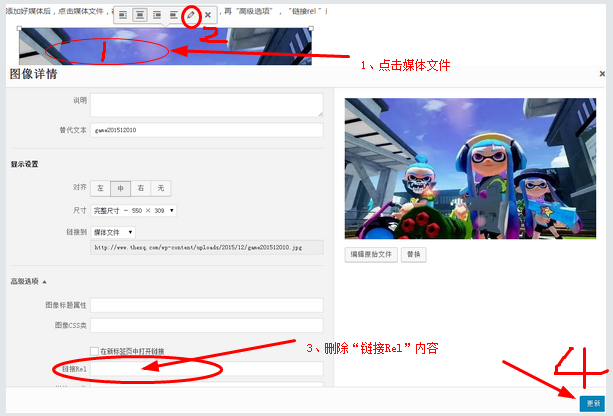
或者,切换TinyMCE编辑器 从WYSIWYG到文本模式,按“CTRL+F”搜索 rel=”attachment wp-att- ,然后删除,注意rel=”attachment wp-att-*** ”后面的双引号也要一起删除。
2、一逸永劳的解决方法
在主题的模板函数 (functions.php)文件中,添加以下代码,则自动删除以后添加媒体文件时的REL参数
add_filter('image_send_to_editor', 'wpse_88984_remove_rel', 10, 2);
function wpse_88984_remove_rel($html, $id) {
    if($id>0)
        $html=str_replace('rel="attachment wp-att-'.$id.'"','',$html);
  return $html;
}
当然,在自新了WordPress V 4.4 以后添加的文章,请手动删除 rel=“attachment wp-att-**”。