WordPress导航栏实现“手气不错”随机功能
今天在boke112上看见的这个功能,点击一下按钮,将会随机显示篇文章的详细内容,也就是所谓的文章页。这个功能比较合适老用户访问站点旧文章,因为这种无法预测的随机感,能给人带来一定的新鲜度。
实现方法:
第一步,把以下代码放到functions.php的最后一个?>前面:
 //导航菜单添加手气不错按钮
function random_postlite() {
 global $wpdb;
 $query = "SELECT ID FROM $wpdb->posts WHERE post_type = 'post' AND post_password = '' AND post_status = 'publish' ORDER BY RAND() LIMIT 1";
 if ( isset( $_GET['random_cat_id'] ) ) {
 $random_cat_id = (int) $_GET['random_cat_id'];
 $query = "SELECT DISTINCT ID FROM $wpdb->posts AS p INNER JOIN $wpdb->term_relationships AS tr ON (p.ID = tr.object_id AND tr.term_taxonomy_id = $random_cat_id) INNER JOIN $wpdb->term_taxonomy AS tt ON(tr.term_taxonomy_id = tt.term_taxonomy_id AND taxonomy = 'category') WHERE post_type = 'post' AND post_password = '' AND post_status = 'publish' ORDER BY RAND() LIMIT 1";
 }
 if ( isset( $_GET['random_post_type'] ) ) {
 $post_type = preg_replace( '|[^a-z]|i', '', $_GET['random_post_type'] );
 $query = "SELECT ID FROM $wpdb->posts WHERE post_type = '$post_type' AND post_password = '' AND post_status = 'publish' ORDER BY RAND() LIMIT 1";
 }
 $random_id = $wpdb->get_var( $query );
 wp_redirect( get_permalink( $random_id ) );
 exit;
}
if ( isset( $_GET['random'] ) )
add_action( 'template_redirect', 'random_postlite' );
PS:代码来源于公子府
第二步,在WordPress后台》外观》菜单中添加一个链接类型的菜单,在URL中输入:http://yigujin.wang/?random(记得把本站域名改为贵站域名哦),在链接文本中输入:手气不错(或其他)。
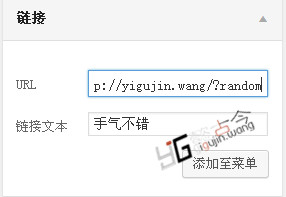
至此,已经成功在WordPress导航栏添加手气不错的按钮功能。